Follow up example, fitting with a model equation
This example demonstrates how to use the EZ module to fit a custom mathematical equation to an impedance vs angular frequency response, measured experimentally at different applied bias. In this example intensity modulated photocurrent spectroscopy (IMPS) data is used. Before reading this page please consult the previous example showcasing in details the use of the classes and methods used here. The only difference herein is the different model definition, using an equation instead of an equivalent circuit (we note that the equation presented in this example can also be fitted with an equivalent circuit composed of two RC circuits in series).
Model equation definition and evaluation
A model equation is defined using the Equation class. This class is initialized using a string describing the equation:
from EZ.model import Equation

J_bulk = r"J_e/(1+(1j*omega*tau_e))"
J_surf = r"J_r/(1+(1j*omega*tau_r))"
expression = fr"{J_bulk} + {J_surf}"
model = Equation(expression)
After its definition the equation can be printed using its print method:
model.print()
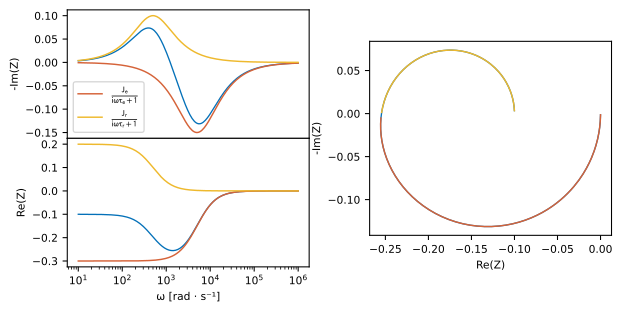
An evaluation of the model equation impedance vs angular frequency response can be plotted using the plot method, in a similar fashion to the model equivalent circuit presented in the EIS example. Passing a partial_models argument also leads to a similar overlay. This argument in this case is a list of strings describing the partial equations. We use it here to display the surface and bulk contributions of the electrode to the impedance response.
pars = {
    "J_e":   dict(value = -0.3),
    "J_r":   dict(value = 0.2),
    "tau_e": dict(value = 2e-4),
    "tau_r": dict(value = 2e-3)
}
model.plot(
    partial_models=[J_bulk, J_surf],
    pars=pars,
    range_omega=[1e1, 1e6]
)
Loading, plotting, fitting and displaying fit results
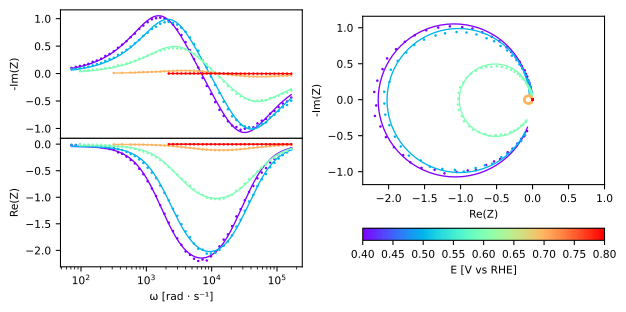
We use the same procedure as the one described in the previous example. We first load the IMPS data in an object of class Dataset and fit it using its fit method, passing the model equation we declared in the above section via the model argument of this method. The results are then displayed and exported, using the plot and export_result methods. The resulting exported file can be consulted here.
from EZ.data import Dataset

ds = Dataset(
    folder="data/IMPS CFO pH14",
    ref=("RHE", 0)
)
ds.fit(model, pars=pars)
ds.plot()
ds.export_result(show=True)
| E [V vs RHE] | tau_r | tau_r std | J_e | J_e std | J_r | J_r std | tau_e | tau_e std |
|---|---|---|---|---|---|---|---|---|
| 0.4 | 0.000581 | 6.58e-06 | -2.42 | 0.0131 | 2.38 | 0.0139 | 3.48e-05 | 3.56e-07 |
| 0.5 | 0.000416 | 4.11e-06 | -2.3 | 0.0114 | 2.26 | 0.0118 | 2.74e-05 | 2.48e-07 |
| 0.6 | 0.000332 | 4.25e-06 | -1.16 | 0.00741 | 1.13 | 0.00768 | 2.19e-05 | 2.58e-07 |
| 0.7 | 0.000229 | 3.63e-06 | -0.135 | 0.0012 | 0.132 | 0.0012 | 2.16e-05 | 3e-07 |
| 0.8 | 0.000151 | 7.19e-06 | -0.00416 | 0.000101 | 0.00399 | 9.95e-05 | 1.57e-05 | 5.59e-07 |