Detailed example, fitting with a model equivalent circuit
This example demonstrates how to use the EZ module to fit an equivalent circuit to an impedance vs angular frequency response, measured experimentally at different applied bias. In this example electrochemical impedance spectroscopy (EIS) data is analyzed.
Equivalent circuit definition
An equivalent circuit can be defined using the classes R, C, Q and W. R correspond to a resistance, C a capacitance, Q a constant phase element and W a Warburg element. In this example we only use R and Q. We initialize all the elements in the circuit with a unique label:
from EZ.model import Q, R

R_sol = R("S")
R_b = R("Bulk")
Q_b = Q("SC")
R_s = R("SS")
Q_s = Q("SS")
Then we can define a model equivalent circuit using these elements. Adding elements is equivalent to connecting them in series and dividing elements is equivalent to connecting them in parallel. Blocks of elements can be constituted using parentheses.
model = R_sol + Q_b/(R_b + Q_s/R_s)
The circuit can be displayed using its print method:
model.print()
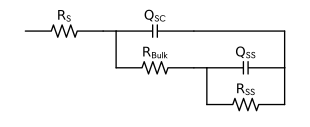
Evaluation of the equivalent circuit impedance vs angular frequency behavior
The EZ module allows to evaluate an equivalent circuit impedance vs angular frequency characteristics. To this mean we need to initialize the parameters of the elements (R and Q) defined above. Depending on the kind of element a different number of parameter has to be initialized. A resistance for example has one parameter, its resistance value, named with “R_” and the label of the considered element. A constant phase element has two parameters, a pseudo-capacitance (“Q_” + label) and a non-ideality factor (“n_” + label). All the parameters are initialized using a dictionary whose keys are the parameter name and whose values are dictionnaries holding the variables used for initialization. These variables have to contain a value and can also contain additional information on the parameter that will be used at the fitting step.
pars = {
    "R_S":    dict( value = 0.025, vary = False ),
    "R_Bulk": dict( value = 10,    min = 0      ),
    "R_SS":   dict( value = 50,    min = 0      ),
    "Q_SC":   dict( value = 1e-3,  min = 0      ),
    "Q_SS":   dict( value = 1e-2,  min = 0      ),
    "n_SC":   dict( value = 0.9,   vary = False ),
    "n_SS":   dict( value = 0.8,   vary = False )
}
The model impedance vs angular frequency is evaluated and displayed in Bode and Nyquist plots using its plot method. A range of frequencies can be passed via the range_omega argument. Moreover, a list of additional circuits can be passed via the partial_models argument. It allows to vizualise the contribution of some components to the overall impedance characteristic. These models impedances are overlayed in the Bode plots. In the Nyquist plot the regions where a partial circuit impedance absolute value is larger is highlighted with a corresponding color. Here for example we use this visualization to show the parts of the circuit influencing respectively the low and high frequencies responses, corresponding respectively to the surface and bulk of an electrode.
model.plot(
    partial_models=[Q_b/R_b, Q_s/R_s],
    pars=pars,
    range_omega = [1e-2, 1e4]
)

Loading and plotting the EIS data
Data loading, plotting and fitting is done using an object of class Dataset. This object initialization requires at least the path to the folder where the files are stored. To be loaded these files should be formatted properly. The files used in this example can be found here, and the details on how to format the files for proper loading are documented here. Optional arguments passed in this example are the pH to convert to RHE and electrode area to normalize the impedance.
from EZ.data import Dataset

ds = Dataset(
    folder="data/EIS CFO pH14 light",
    pH=14,
    area=0.25
)
In this example we recorded the impedance at frequencies up to 10 MHz. Since there is no relevant impedance trend above 10 kHz change the dataset range of frequencies using the set_freq_range method. Then the dataset is plotted using the plot method where the data is represented as full circles.
ds.set_freq_range([1e-10, 1e4])
ds.plot()
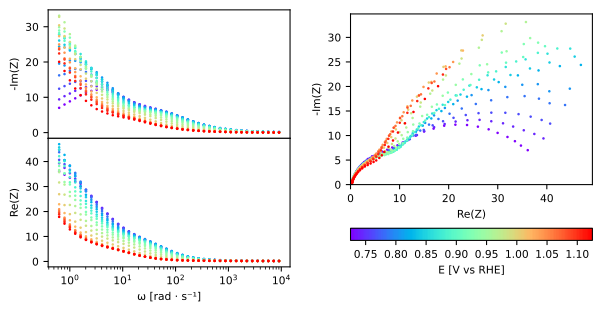
Fitting and exporting fit results
The fit is performed using the fit method. This method requires two arguments, the model used for the fit, defined here as an equivalent circuit, and a dictionary setting the model parameters initial guess and constraints. In this dictionnary, declared previously, we fixed some parameters (R_S, n_SC and n_SS) by setting the variable vary to False. We also set the remaining parameters to be positive by setting the variable min to 0. Maximum values could be used also using the variable max.
ds.fit(model, pars=pars)
Once the fit is performed, using the plot method also displays an evaluation of the fit as a full line of the same color as the corresponding data:
ds.plot()
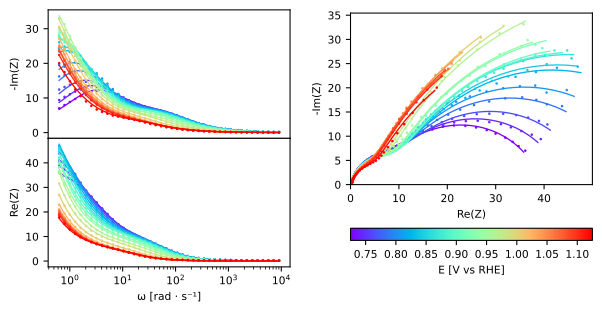
The raw data and corresponding fit can be exported using the export method. The resulting exported files for this example can be consulted here.
ds.export()
The parameters fitted value and standard error can be exported using the export_result method. The resulting exported files for this example can be consulted here. Passing the argument show=True to this method also displays these values as shown below.
ds.export_result(show=True)
| value (fixed) | |
|---|---|
| R_S | 0.025 |
| n_SC | 0.900 |
| n_SS | 0.800 |
| E [V vs RHE] | Q_SC | Q_SC std | R_Bulk | R_Bulk std | Q_SS | Q_SS std | R_SS | R_SS std |
|---|---|---|---|---|---|---|---|---|
| 0.725 | 0.00226 | 2.18e-05 | 13.4 | 0.151 | 0.0132 | 0.000166 | 26.1 | 0.149 |
| 0.745 | 0.00213 | 3.02e-05 | 13.7 | 0.199 | 0.0142 | 0.000215 | 30.5 | 0.206 |
| 0.765 | 0.00208 | 3.51e-05 | 14.1 | 0.219 | 0.0154 | 0.000235 | 35.3 | 0.248 |
| 0.785 | 0.00204 | 3.73e-05 | 13.5 | 0.21 | 0.0155 | 0.000192 | 43.6 | 0.277 |
| 0.805 | 0.00207 | 6.17e-05 | 13 | 0.317 | 0.0159 | 0.000264 | 50.1 | 0.48 |
| 0.825 | 0.00214 | 4.25e-05 | 13.7 | 0.209 | 0.0174 | 0.000173 | 60 | 0.424 |
| 0.845 | 0.00224 | 5.91e-05 | 13.2 | 0.264 | 0.0181 | 0.000222 | 63.1 | 0.602 |
| 0.865 | 0.00231 | 4.66e-05 | 12.6 | 0.189 | 0.0187 | 0.000156 | 69.2 | 0.513 |
| 0.885 | 0.00252 | 4.85e-05 | 13.1 | 0.187 | 0.0207 | 0.000176 | 70.4 | 0.595 |
| 0.905 | 0.00277 | 5.82e-05 | 13.1 | 0.205 | 0.0228 | 0.000217 | 72.5 | 0.783 |
| 0.925 | 0.00294 | 7.19e-05 | 11.8 | 0.217 | 0.0223 | 0.000203 | 80.2 | 0.925 |
| 0.945 | 0.00351 | 6.53e-05 | 12 | 0.179 | 0.0244 | 0.000182 | 81.4 | 0.848 |
| 0.965 | 0.0041 | 6.22e-05 | 10.7 | 0.14 | 0.0233 | 0.00011 | 102 | 0.83 |
| 0.985 | 0.0055 | 6.83e-05 | 10.8 | 0.132 | 0.0258 | 0.000109 | 106 | 0.913 |
| 1.005 | 0.00775 | 9.38e-05 | 9.88 | 0.142 | 0.0277 | 0.000117 | 107 | 0.969 |
| 1.025 | 0.0102 | 0.000134 | 9.58 | 0.171 | 0.031 | 0.000163 | 97.5 | 1.11 |
| 1.045 | 0.0112 | 0.000179 | 9.15 | 0.2 | 0.0338 | 0.000219 | 94.9 | 1.44 |
| 1.065 | 0.0113 | 0.000146 | 8.69 | 0.148 | 0.0361 | 0.000191 | 87.1 | 1.06 |
| 1.085 | 0.0111 | 0.000146 | 8.29 | 0.136 | 0.0376 | 0.000191 | 91.1 | 1.19 |
| 1.105 | 0.0109 | 0.000137 | 8.12 | 0.119 | 0.0408 | 0.000203 | 87.1 | 1.18 |
| 1.125 | 0.0108 | 0.000296 | 7.79 | 0.225 | 0.0481 | 0.000571 | 74.2 | 2.42 |